
InBodyTouch - Smart Kiosk Body Composition System
Smart Kiosk System for Easy InBody Test Result Access and Effective Expert Consultation Support
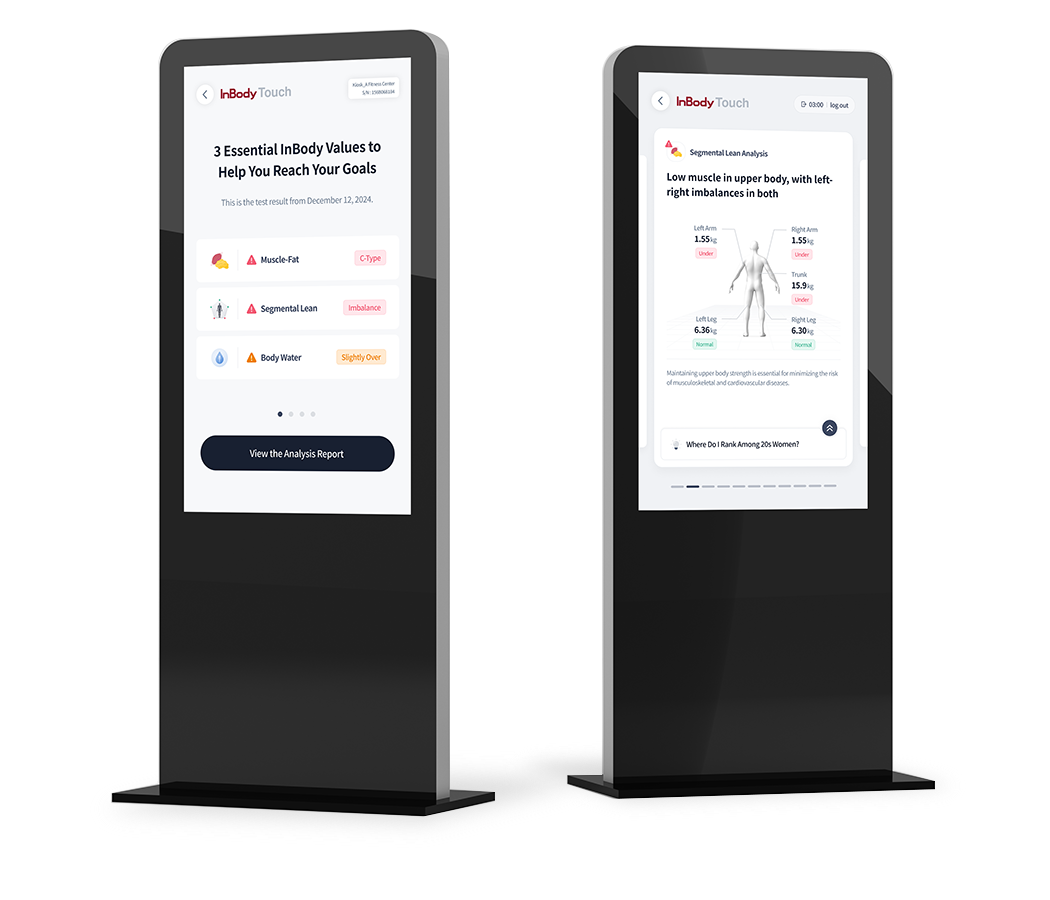
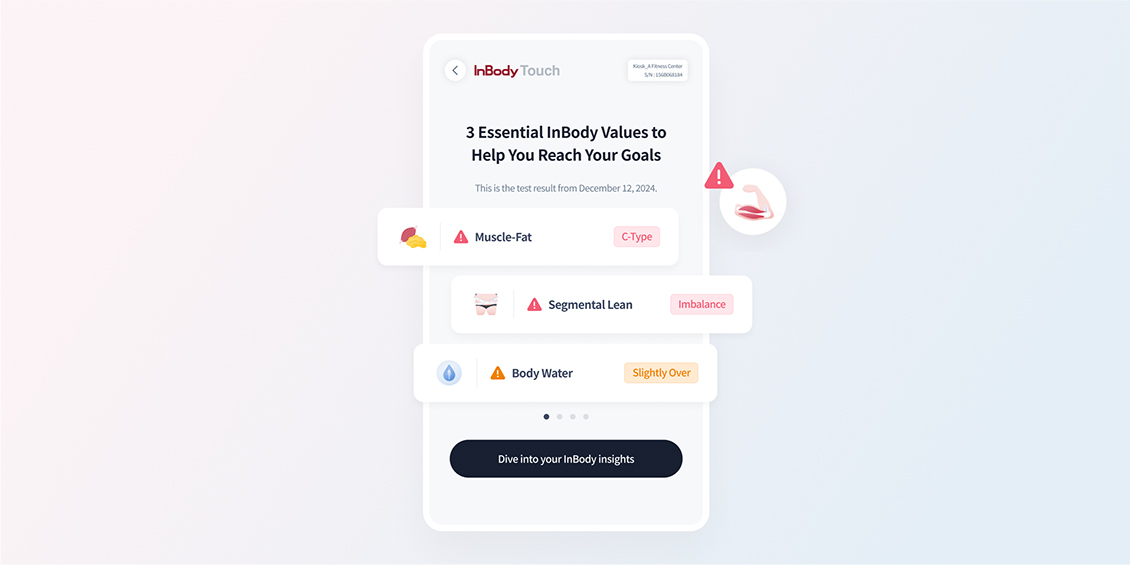
Data-Driven Reports and Efficient Expert Consultation Support
Analyze health status based on big data to quickly identify outputs for improvement. The freehand drawing feature on the Result Sheet allows for clear, intuitive explanations, enhancing the efficiency of consultations.
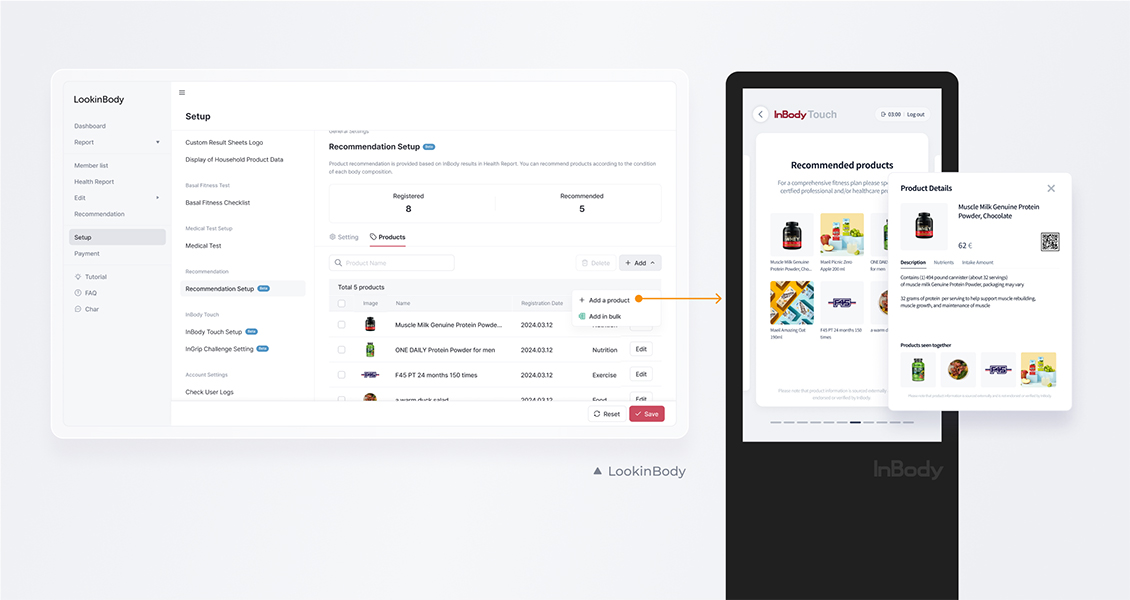
Personalized Device Recommendations Based on Test Results
Automatically recommend suitable devices to customers by analyzing body composition data. Personalized solutions are seamlessly presented during expert consultations, enhancing customer satisfaction and expanding new business opportunities.
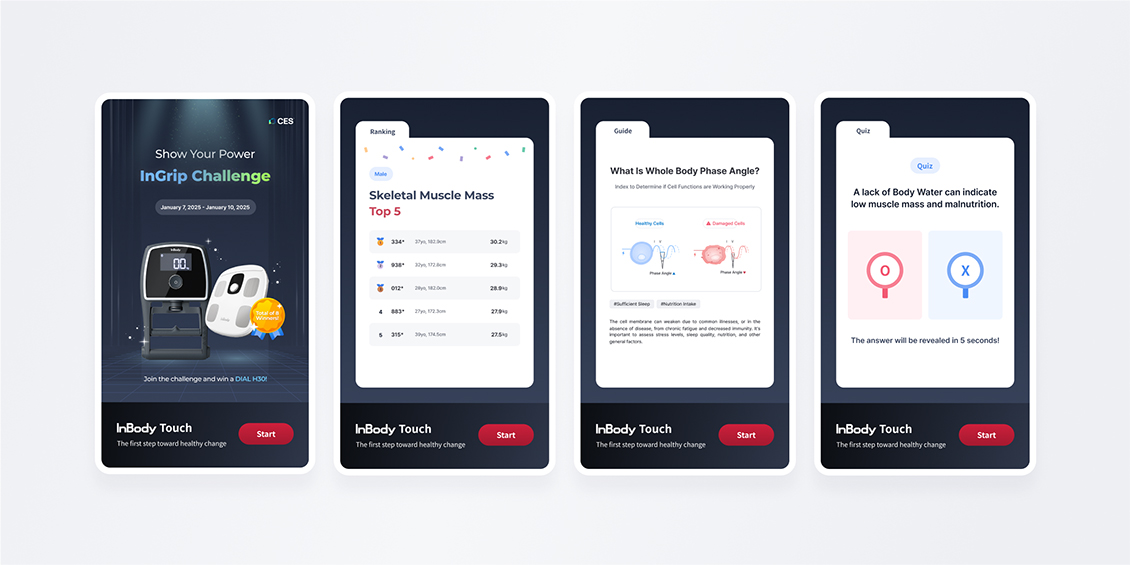
Personalized Waiting Screen Designed to Capture Customer Attention
Display logos, promotions, and event information tailored to each brand on a personalized waiting screen to promote your brand naturally. Additionally, engage customers with real-time rankings, health guides, and quizzes, turning waiting time into a valuable experience.
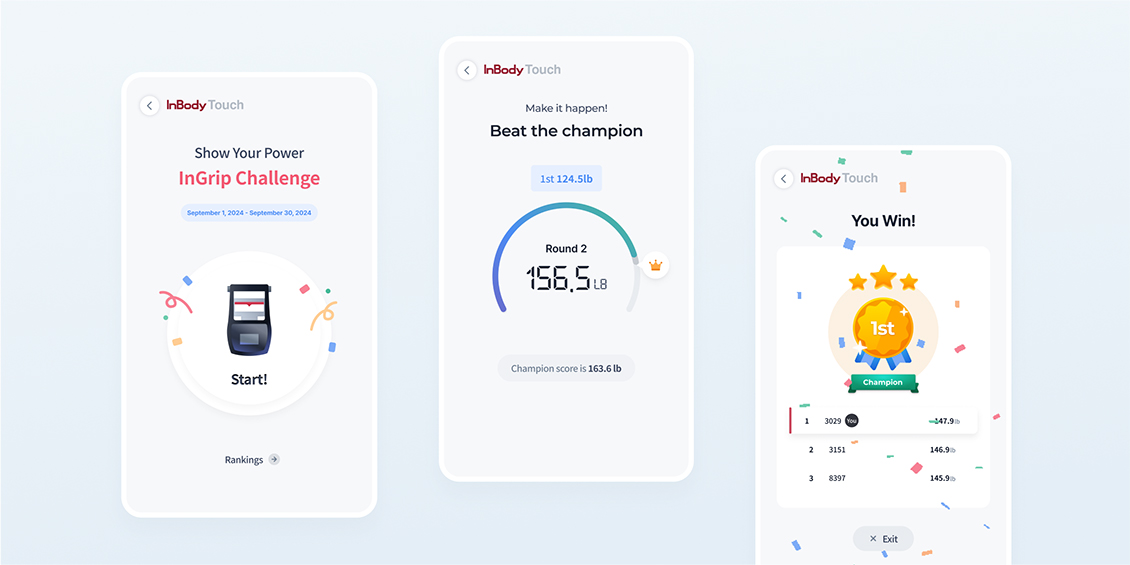
Fun InGrip Challenge for Everyone
With simple challenges, customers can check their Hand Grip Strength and compare rankings. The excitement of competition, along with engaging activities, increases participation and brings new energy to the site.
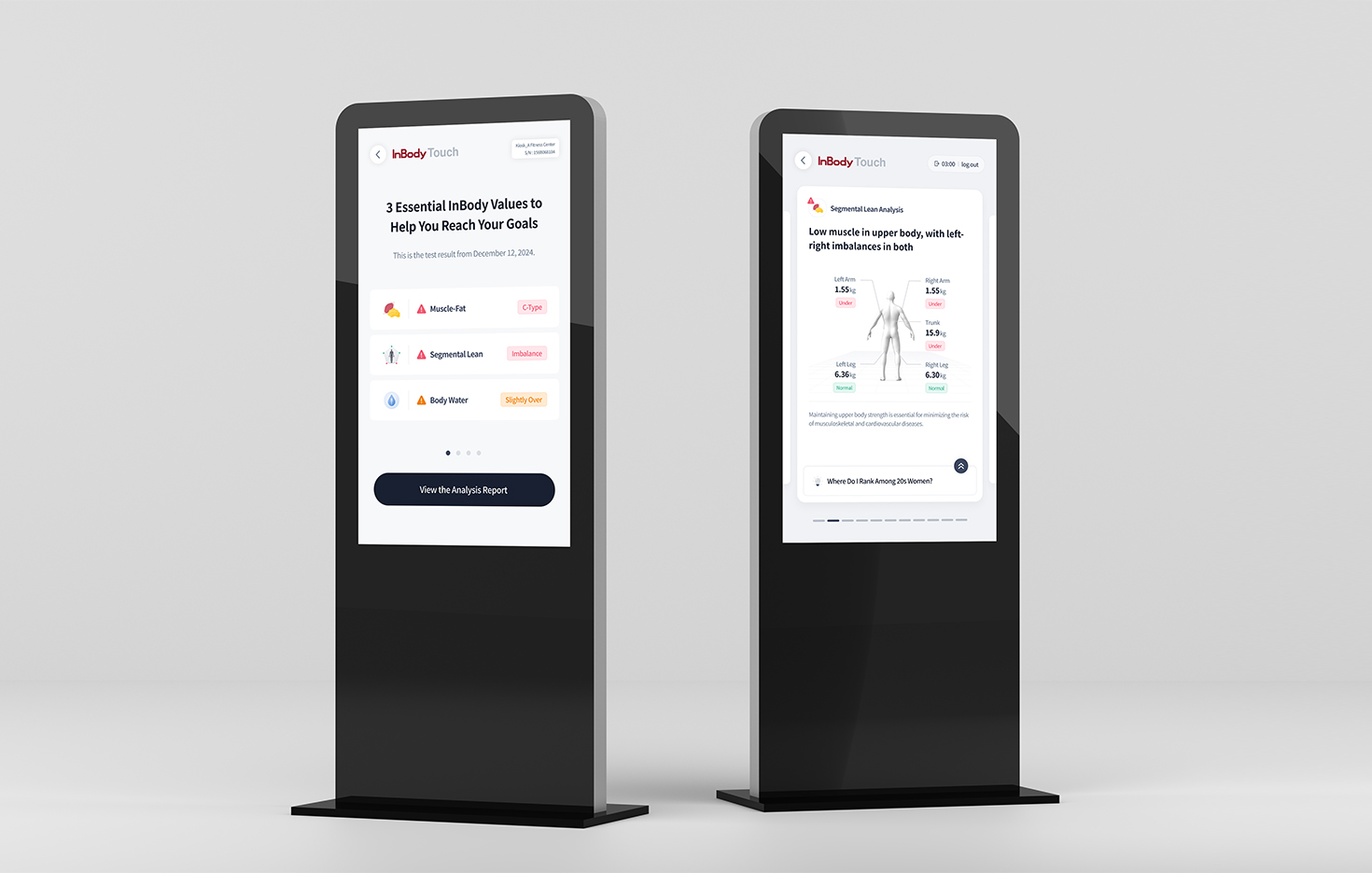
InBody Touch utilizes over 150 million health data records to deliver optimal health management solutions for both customers and experts. Intuitive reports make it easy to understand health status, while the freehand drawing feature enhances the efficiency of expert consultations. Personalized, data-driven management supports more effective health management.
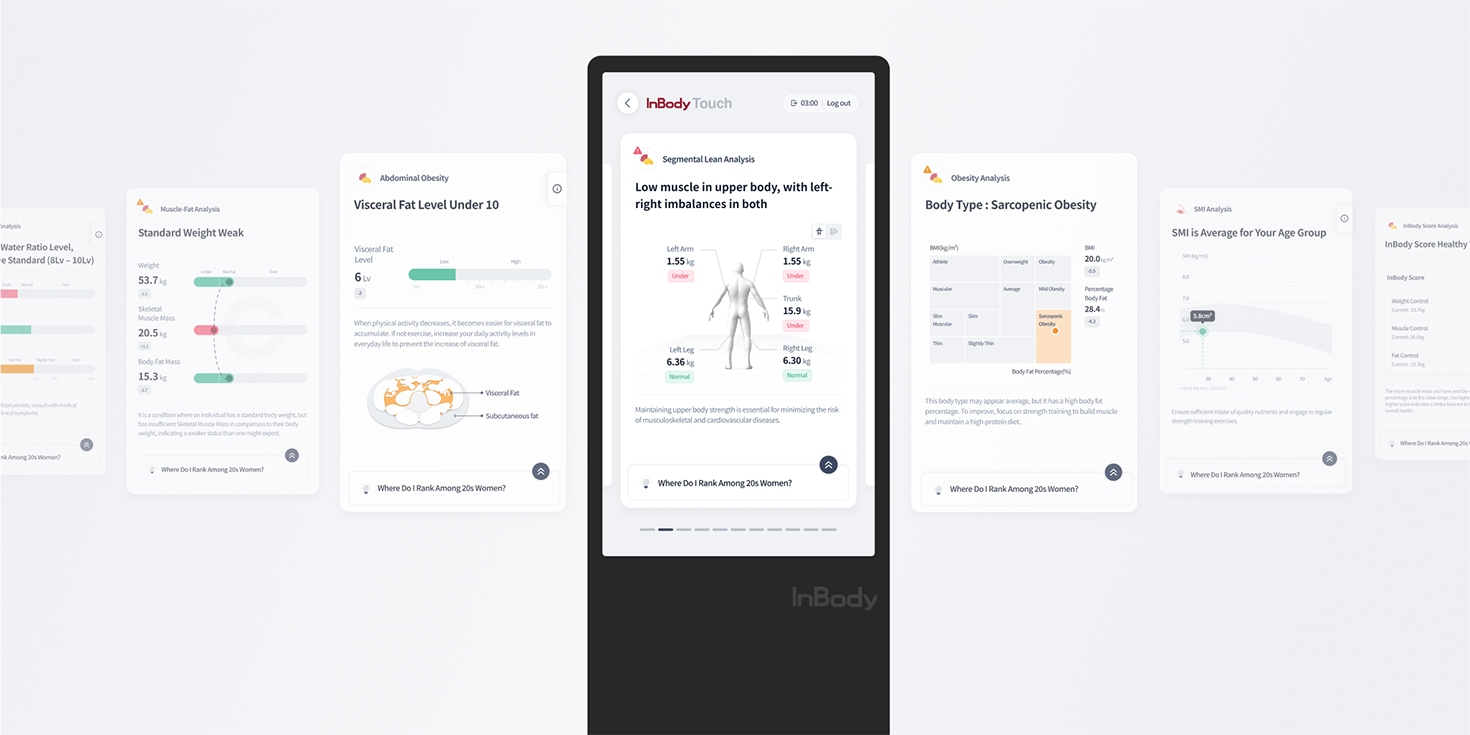
InBody Touch summarizes outputs for improvement in the InBody Test results, helping customers quickly identify key points without missing any important details. This enables efficient and convenient health management. Additionally, data visualization makes complex information easy to understand.
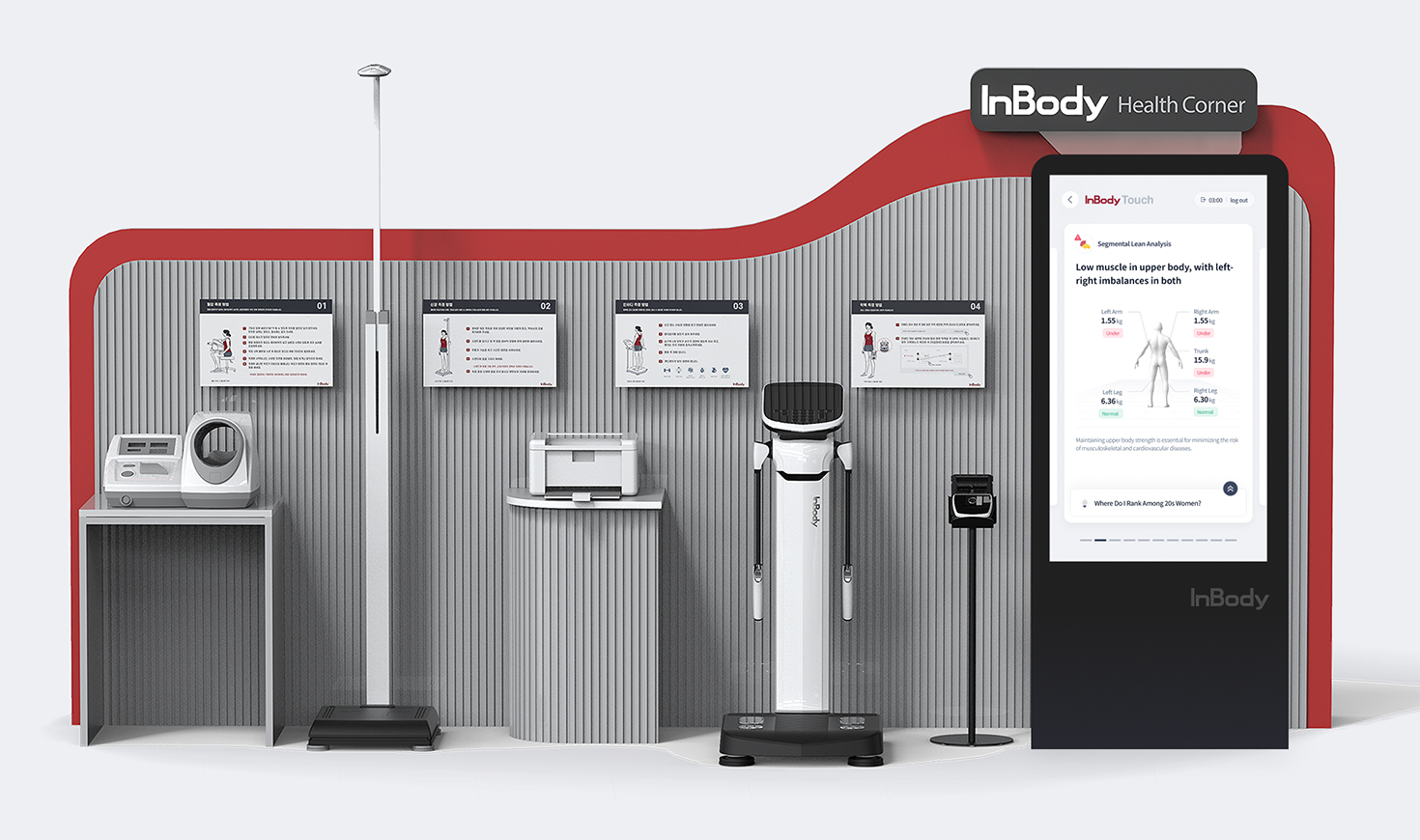
It is designed for easy use without confusion, ensuring a clear understanding of each device's operation. Additionally, each device is modular, allowing for flexible configuration based on the environment.
Specifications
Features
- Waiting Screen
- 1. Automatic Transition of Videos and Images
2. Automatic Transition of InBody Test Result Rankings
3. Automatic Transition of InBody Outputs
(Phase Angle / Extracellular Water / Visceral Fat / SMI / Blood Pressure / Relative Hand Grip Strength)
4. Automatic Transition of InBody-Related OX Quizzes
- My Test Results
- 1. Comprehensive Results and Detailed Explanations of InBody Outputs
-Result Summary Analysis / Muscle-Fat Analysis / Obesity Analysis / Segmental Lean Analysis / Total Body Water Analysis / InBody Score Analysis / Abdominal Obesity Analysis / SMI (Skeletal Muscle Mass Index) Analysis / Whole Body Phase Angle Analysis / InBody Age Analysis / Blood Pressure Analysis / Hand Grip Strength Analysis
2. Original Result Sheet Display and Drawing Tools
-Pen / Highlighter / Eraser , Thickness Adjustment, Delete, Export
- Understanding the Result Sheet
- 1. Adjust the Graph to Compare InBody Results and View Explanations
- Muscle-Fat Analysis / Segmental Lean Analysis / Total Body Water Analysis / SMI (Skeletal Muscle Mass Index) Analysis / Abdominal Obesity Analysis / Whole Body Phase Angle Analysis / Blood Pressure Analysis / Hand Grip Strength Analysis
2. Detailed Explanation of the Current Condition
-Key Information / Goal Setting / Recommendations / Personalized Recommendations
- InBody Test Guide
- Pre-Test Precautions
-Before Exercise / Pacemaker / Belongings / Pregnancy / Menstruation / Bathroom
- InGrip Challenge
- 1. Challenge Registration
- Challenge Registration via Mobile Number
2. Hand Grip Strength Test
- Hand Grip Strength Challenge (Measured Twice)
- Settings
- 1. Waiting Screen Settings
-Select Video and Image
2. User Mode Settings
-Select Main Screen Menu
3. LookinBody Connection
-LB Web Login
-Administrator Mode
* The above contents are subject to change without prior notice for appearance and device performance improvements.
System Requirements
- Operation System
- Android 7.1.2 or Higher
- Resolution
- 1080 × 1920 (Optimal Resolution)
- Memory
- 2GB or Higher
InBody Touch 43i
- Model
- InBody Touch
- Inches
- 43 Inches
- Dimensions
- 1780 (L) x 602 (W) x 450 (H) : mm
70 (L) x 23.7 (W) x 17.7 (H) : in
- Weight
- 37.5 kg (82.7 lb)
- Power
- AC 100 V - 240 V~, 50 - 60 Hz, 1.2 A
- CPU
- Quad-Core Cortex-A17 up to 1.8 GHz
- GPU
- Mali-T764 GPU, Supports OpenGLES 1.1 and 2.0
- MEMORY (RAM / FLASH)
- DDR3 RAM 2 GB (4 G optional) / EMMC 16 G (32 G optional)
- Resolution
- IPS 1080 x 1920, 1080 p
- Screen Brightness
- 350 cd (up to 450 cd)
- Touch Panel
- 10 Points Capacity Touch Panel (Optional)
- Ethernet
- GIGA Ethernet LAN RJ45
- Wi-Fi
- Wi-Fi 2.4 GHz / 5.8 GHz
- Multimedia
- Supports UHD 4 K 60 fps HW decoding, supports multiple formats including H.265 10 - bit, H264 and AVS+ HDR10 and HLG HDR processing FHD 1080 p 30 fps HW encoding, H.264
- Video Codec
- VP9 - 10, H.265 uo to 4 K x 2 K @ 60 fps, h.265 WMV, MPEG - 1, AVS, Realvideo up tp 1080 p @ 60 fps
- Video Format
- MKV, WMV, MPG, MPEG, AVI, MOV, ISO, MP4, RM, JPG
- Audio Format
- MP3, WMA, AAC, WAV, OGG, AC3, FLCA
- Connection
- USB 2.0 / Ethernet
- Bluetooth
- Support 4.0
- Touch
- KiO AK 43 / 55 ST STAND Series Available
- Input Jack
- USB 2.0 / USB Type 2Port Wired Ethernet connection 10/100/1000 Mb High-speed eMMC Extension Interface Power Input (AC 220 V)
- Output Terminal
- Internal Speaker HDMI (Video / Audio Integration)
- Wireless Signal
- Wi-Fi Reception Support (2.4 GHz / 5.8 GHz)
- Image Support
- JPG, JPEG, MJPEG, PNG, GIF
- Supported Languages
- Languages supported by Android include Korean, English, German, Japanese, Chinese, etc.
- Operation Environment
- 10 - 40 °C (50 - 104℉), 30 - 75 % RH, 70 - 106 kPA
- Storage Environment
- ‒10 - 70 °C (14 - 158 °F), 10 - 80 % RH, 50 - 106 kPA (No condensation)
* Specifications can be changed without a prior notice.
* This product is a medical device.
InBody Touch 24i
- Model
- InBody Touch 24i
- Inches
- 24 Inch
- Dimensions
- 578 (W) x 348 (H) x 43 (D) : mm
22.7 (W) x 13.7 (H) x 1.69 (D) : in
- Weight
- 4.2 kg (9.25 lb)
- Power Input
- AC 100V - 240 V~, 50 - 60 Hz, 1.5 A
- Power Output
- DC 12 V⎓, 3 A
- CPU
- Dual - Core, Cortex A72 1.8 GHz and Quad - core Cortex - A 53 1.5 GHz
- GPU
- ARM Mali -T864 GPU
- MEMORY (RAM / FLASH)
- LPDDR3 RAM 4 GB / EMMC 5.0 32 G (64 G optional)
- Resolution
- IPS 1080 p
- Screen Brightness
- 300 cd
- Ethernet
- GIGA Ethernet LAN RJ45
- Wi-Fi
- Wi-Fi 2.4 GHz / 5.8 GHz
- Multimedia
- 4K H265 / H264 video decoders, 1080P other video decoders (VC-1, MPEG - 1 / 2 / 4, VP8), 1080P video encoder for H.264 and VP8, Video post processor: de-interlace, de-noise, enhancement for edge/detail/color
- Video Codec
- 4K VP9 and 4K 10bits H265 / H264 video decoding, up to 60fps, 1080P multi-format video decoding, (WMV, MPEG - 1 / 2 / 4, VP9, H265, H264) 1080P video coding, supports H264 / H265
- Video Format
- MKV, WMV, MPG, MPEG, AVI, MOV, ISO, MP4, RM, JPG
- Audio Format
- MP3, WMA, AAC, WAV, OGG, AC3, FLCA
- Connection
- USB 2.0 / Ethernet
- Bluetooth
- IEEE 80.2.11 a / n / ac, 2.4 GHz, 5 GHz / 5.0 Support
- Touch
- Capacitive Touch (Available)
- Input Jack
- USB 3.0 / USB 2.0 type 2 Port, Type - C (OTG) 10 / 100 / GIGA Ethernet LAN High - Speed EMMC extension interface Power Input (DC 12 V 3 A)
- Output Terminal
- Internal Speaker HDMI (Video / Audio Integration)
- Wireless Signal
- Wi-Fi Reception Support (2.4 GHz / 5.8 GHz)
- Image Support
- JPG, JPEG, MJPEG, PNG, GIF
- Supported Languages
- All languages supported on Android, including Korean, English, German, and others
- Operation Environment
- 10 - 40 °C (50 - 104℉), 30 - 75 % RH, 70 - 106 kPA
- Storage Environment
- ‒10 - 70 °C (14 - 158 °F), 10 - 80 % RH, 50 - 106 kPA (No condensation)
* This device has been certified for use in a commercial environment.
Using it in a residential environment may cause radio interference.